> For the complete documentation index, see [llms.txt](https://redengine-docs.instant-modz.com/llms.txt). Markdown versions of documentation pages are available by appending `.md` to page URLs; this page is available as [Markdown](https://redengine-docs.instant-modz.com/premium-menu/nexus-menu/download.md).
# Download
{% hint style="info" %}
Nexus Menu, is not downloadable for security reasons.
{% endhint %}
After purchasing Nexus Menu you should have received a key by email, to use it you need to login to your redengine.eu account and redeem the key as redENGINE:
Then after redeeming your key open redENGINE and inject it and join a server then open redENGINE and go to the Menus category and click on Nexus Menu and click on the "Run" button
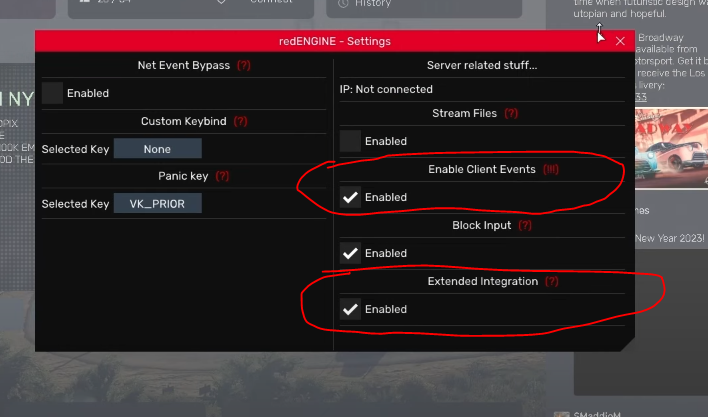
Then you need to activate "Client Event" and "Extended Integration" for Nexus to work properly. I recommend that you don't activate "Block Input", as some anticheats can detect this function and it's not really useful.
.gif?alt=media&token=91642ec4-4f98-4bb6-b2ab-a7f8d7a258e1)